> ## Documentation Index
> Fetch the complete documentation index at: https://docs.immitranslate.com/llms.txt
> Use this file to discover all available pages before exploring further.
# OAuth Apps
If you run a platform, such as a case management system, whose users each have their own ImmiTranslate account, create an OAuth app instead of asking every user for an API key. Your users connect their ImmiTranslate account to your platform, signing up first if they need to, and your platform receives an access token for that account.
Create an app on the [Developer Apps page](https://portal.immitranslate.com/settings/developer-apps) to get a client ID and client secret, and register the redirect URIs your platform uses. An access token can do everything the person who connected it can do in their account.
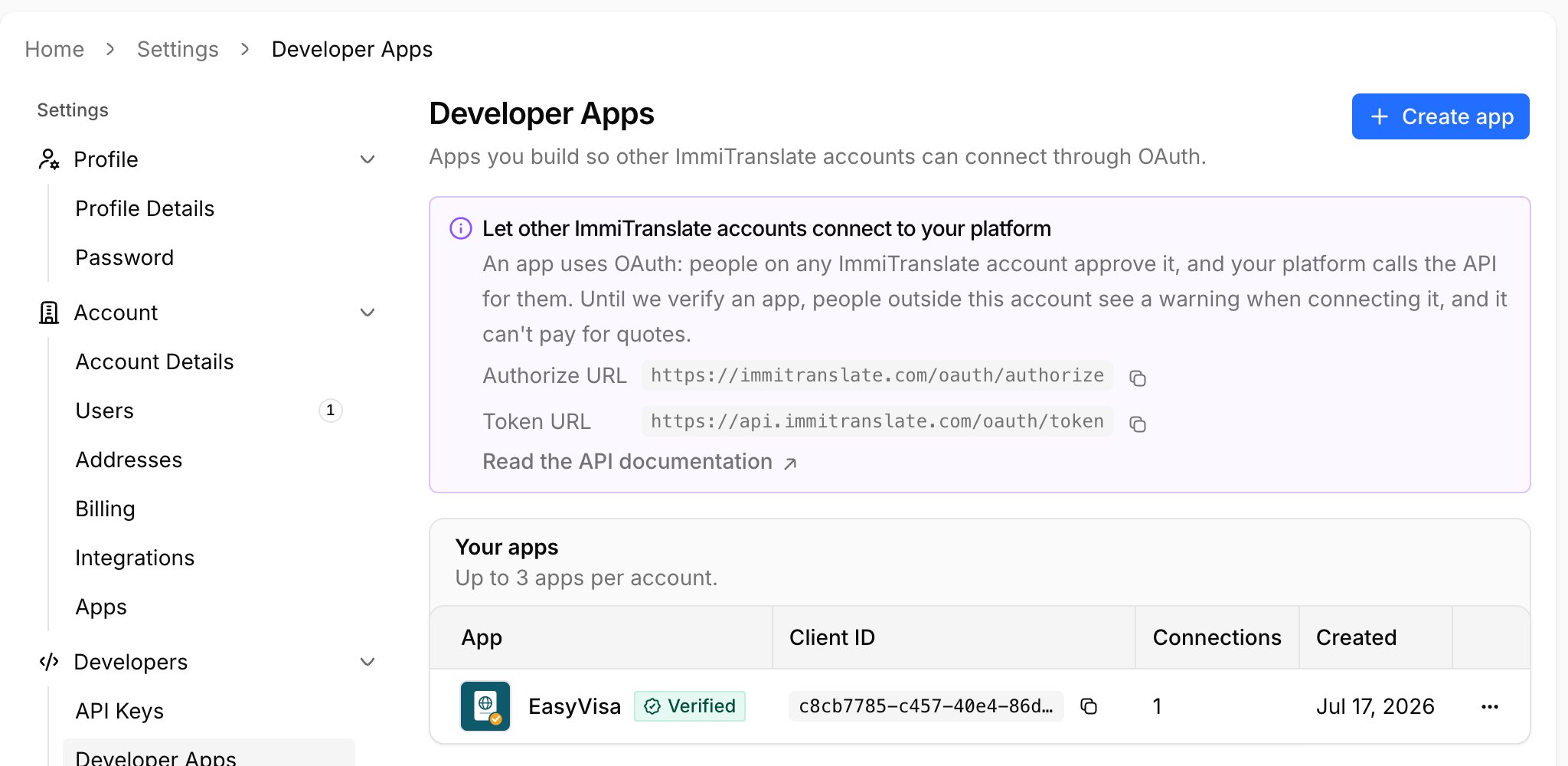
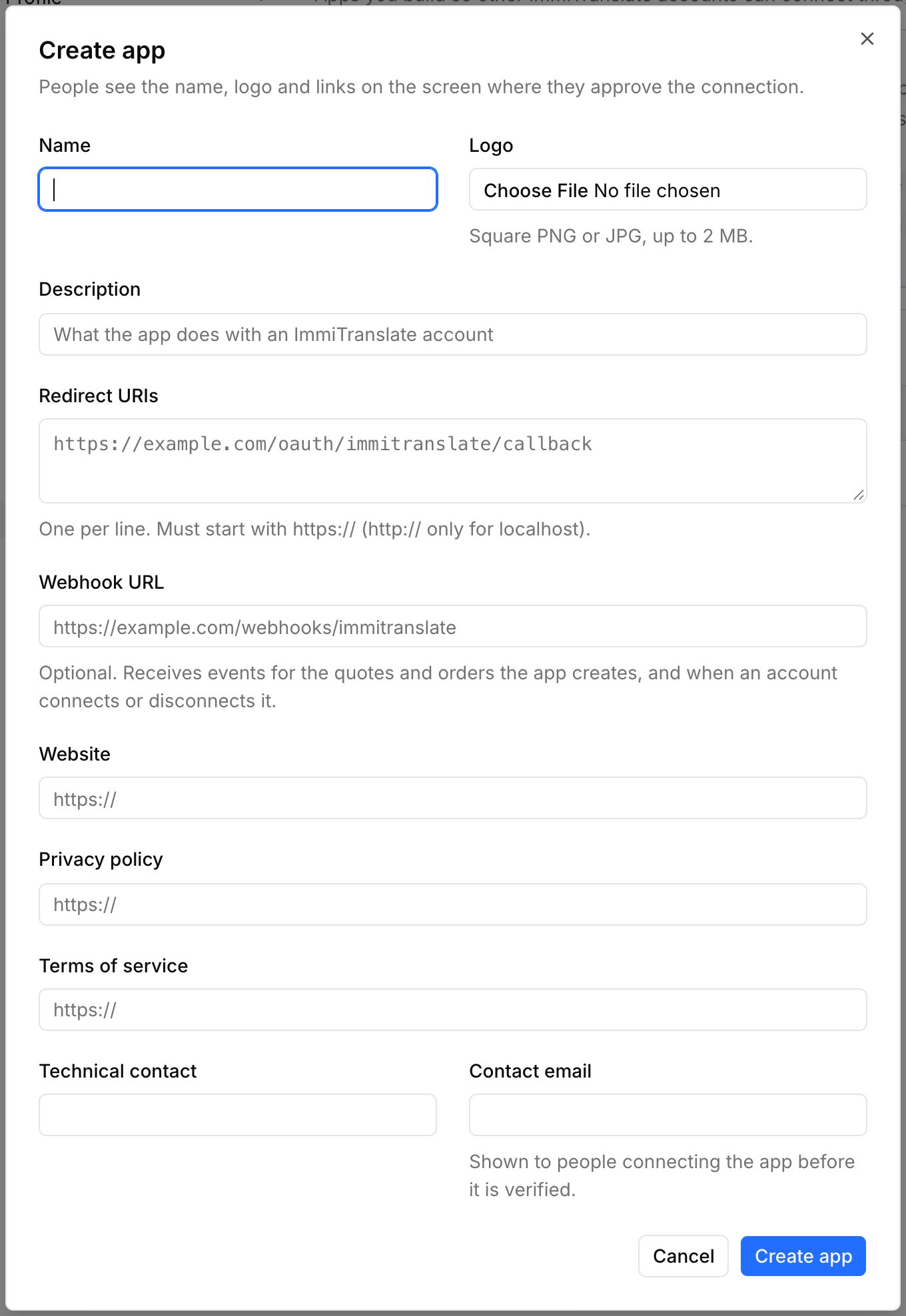 New apps are unverified: people outside your own account see a warning when connecting them, and they cannot pay for quotes. See [Verification](#verification).
## 1. Send the user to ImmiTranslate
```bash theme={null}
https://immitranslate.com/oauth/authorize?client_id=CLIENT_ID&redirect_uri=https%3A%2F%2Fexample.com%2Fcallback&response_type=code&state=RANDOM_STATE
```
| Parameter | Description |
| - | - |
| `client_id` | Your app's client ID. |
| `redirect_uri` | One of the redirect URIs registered for your app, exactly as registered. |
| `response_type` | Always `code`. |
| `state` | A random value you check when the user comes back, to prevent cross-site request forgery. |
| `prompt` | Optional. `create` opens sign-up instead of log in, for users who don't have an ImmiTranslate account yet. `consent` always shows the approval screen. `login` asks the user to log in again. |
| `login_hint` | Optional. The user's email address, pre-filled on the log in or sign-up form. |
| `code_challenge`, `code_challenge_method` | Optional [PKCE](https://datatracker.ietf.org/doc/html/rfc7636), with `S256`. |
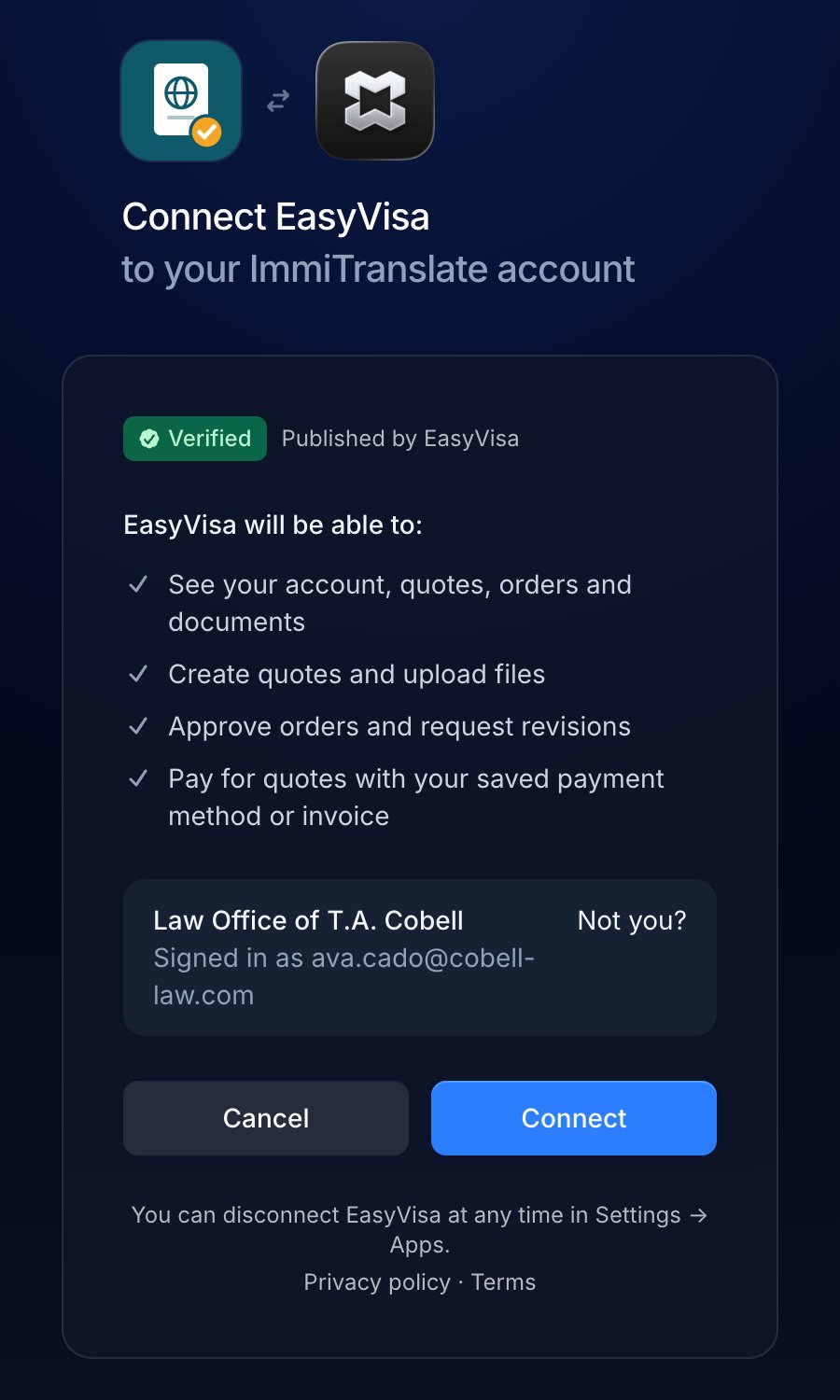
The user logs in or signs up, then approves the connection. If they have already connected your app, ImmiTranslate sends them straight back. An account can limit connecting apps to its admins; other users are told to ask an admin.
New apps are unverified: people outside your own account see a warning when connecting them, and they cannot pay for quotes. See [Verification](#verification).
## 1. Send the user to ImmiTranslate
```bash theme={null}
https://immitranslate.com/oauth/authorize?client_id=CLIENT_ID&redirect_uri=https%3A%2F%2Fexample.com%2Fcallback&response_type=code&state=RANDOM_STATE
```
| Parameter | Description |
| - | - |
| `client_id` | Your app's client ID. |
| `redirect_uri` | One of the redirect URIs registered for your app, exactly as registered. |
| `response_type` | Always `code`. |
| `state` | A random value you check when the user comes back, to prevent cross-site request forgery. |
| `prompt` | Optional. `create` opens sign-up instead of log in, for users who don't have an ImmiTranslate account yet. `consent` always shows the approval screen. `login` asks the user to log in again. |
| `login_hint` | Optional. The user's email address, pre-filled on the log in or sign-up form. |
| `code_challenge`, `code_challenge_method` | Optional [PKCE](https://datatracker.ietf.org/doc/html/rfc7636), with `S256`. |
The user logs in or signs up, then approves the connection. If they have already connected your app, ImmiTranslate sends them straight back. An account can limit connecting apps to its admins; other users are told to ask an admin.
 ## 2. Receive the code
ImmiTranslate redirects to your `redirect_uri` with `code` and your `state`. If the user cancels, it redirects with `error=access_denied` instead.
## 3. Exchange the code for tokens
```bash theme={null}
curl "https://api.immitranslate.com/oauth/token" \
-d grant_type=authorization_code \
-d client_id=CLIENT_ID \
-d client_secret=CLIENT_SECRET \
-d redirect_uri=https://example.com/callback \
-d code=CODE
```
```json theme={null}
{
"token_type": "Bearer",
"expires_in": 10368000,
"access_token": "eyJ0eXAiOiJKV1Qi...",
"refresh_token": "def50200..."
}
```
Call the API with the access token exactly as you would with an API key: `Authorization: Bearer ACCESS_TOKEN`. Access tokens last 120 days. Before one expires, get a new pair with `grant_type=refresh_token`, your client ID and secret, and the `refresh_token`. Each refresh token works once and lasts 2 years.
To find out who connected your app, call [Get Account](/account#get-account): `user` is the person the token acts for, and `app` says whether your app is verified and can pay.
## 4. Disconnect
```bash theme={null}
curl "https://api.immitranslate.com/oauth/revoke" \
-d client_id=CLIENT_ID \
-d client_secret=CLIENT_SECRET \
-d token=ACCESS_OR_REFRESH_TOKEN
```
When a user disconnects ImmiTranslate from your platform, revoke their token ([RFC 7009](https://datatracker.ietf.org/doc/html/rfc7009)). Send either the access token or the refresh token, with your client ID and secret in the body or as HTTP Basic authentication; `token_type_hint` is optional. The connection is removed from the user's ImmiTranslate account and every token your app holds for them stops working. The response is `200` with an empty body, even if the token was already revoked or unknown. A wrong client ID or secret returns `401` with `invalid_client`.
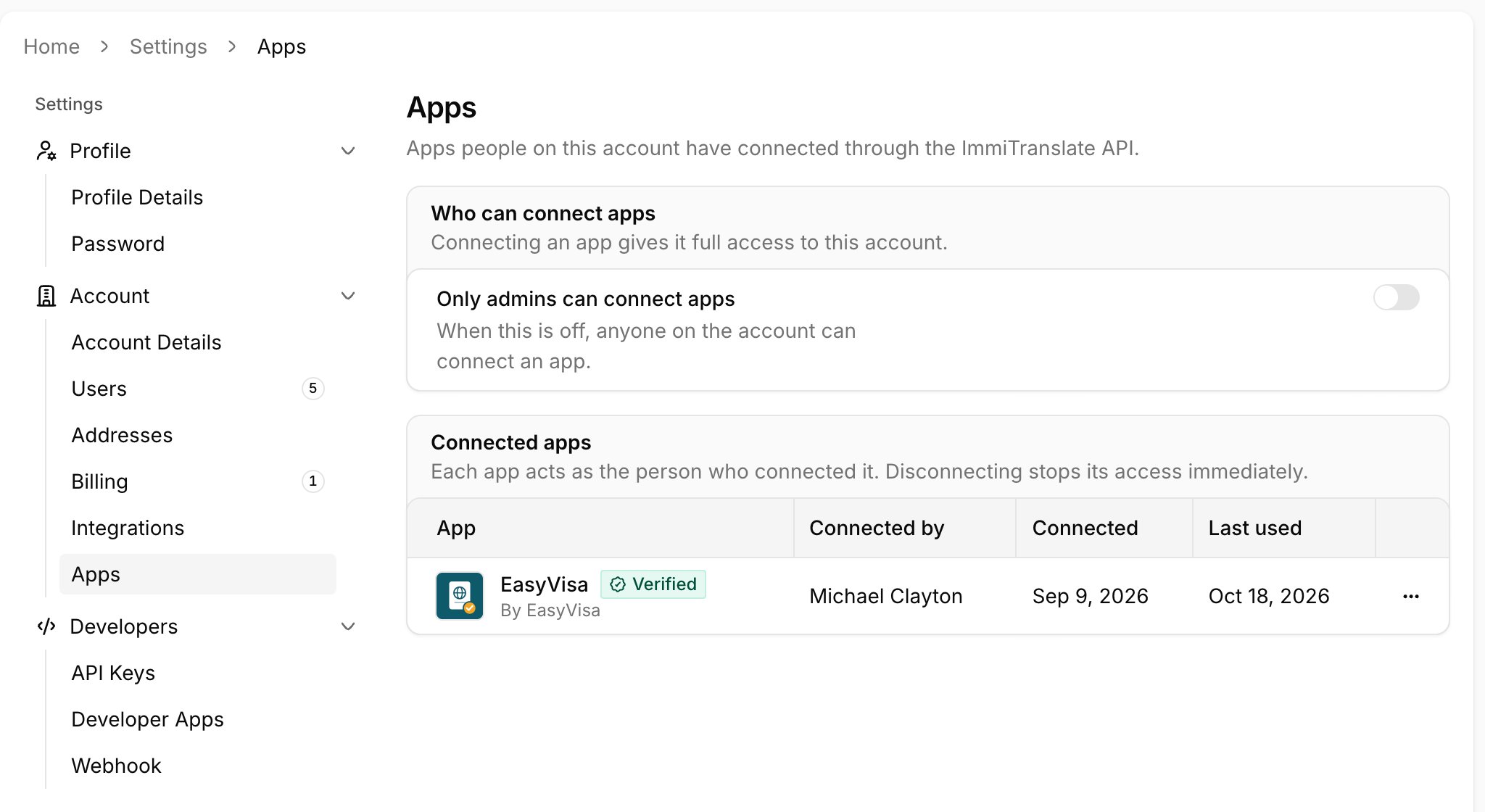
People can also disconnect your app themselves, under Settings → Apps in their ImmiTranslate account. You receive a `connection` / `revoked` [webhook](#webhooks-for-apps) when they do.
## 2. Receive the code
ImmiTranslate redirects to your `redirect_uri` with `code` and your `state`. If the user cancels, it redirects with `error=access_denied` instead.
## 3. Exchange the code for tokens
```bash theme={null}
curl "https://api.immitranslate.com/oauth/token" \
-d grant_type=authorization_code \
-d client_id=CLIENT_ID \
-d client_secret=CLIENT_SECRET \
-d redirect_uri=https://example.com/callback \
-d code=CODE
```
```json theme={null}
{
"token_type": "Bearer",
"expires_in": 10368000,
"access_token": "eyJ0eXAiOiJKV1Qi...",
"refresh_token": "def50200..."
}
```
Call the API with the access token exactly as you would with an API key: `Authorization: Bearer ACCESS_TOKEN`. Access tokens last 120 days. Before one expires, get a new pair with `grant_type=refresh_token`, your client ID and secret, and the `refresh_token`. Each refresh token works once and lasts 2 years.
To find out who connected your app, call [Get Account](/account#get-account): `user` is the person the token acts for, and `app` says whether your app is verified and can pay.
## 4. Disconnect
```bash theme={null}
curl "https://api.immitranslate.com/oauth/revoke" \
-d client_id=CLIENT_ID \
-d client_secret=CLIENT_SECRET \
-d token=ACCESS_OR_REFRESH_TOKEN
```
When a user disconnects ImmiTranslate from your platform, revoke their token ([RFC 7009](https://datatracker.ietf.org/doc/html/rfc7009)). Send either the access token or the refresh token, with your client ID and secret in the body or as HTTP Basic authentication; `token_type_hint` is optional. The connection is removed from the user's ImmiTranslate account and every token your app holds for them stops working. The response is `200` with an empty body, even if the token was already revoked or unknown. A wrong client ID or secret returns `401` with `invalid_client`.
People can also disconnect your app themselves, under Settings → Apps in their ImmiTranslate account. You receive a `connection` / `revoked` [webhook](#webhooks-for-apps) when they do.
 ## Verification
New apps start unverified. Until your app is verified:
* People outside your own account see a warning when they connect it.
* It can't pay for quotes. `Pay Quote`, and `autobuy` on `Create Quote`, return [`payment_requires_verified_app`](#errors).
A verified app shows a Verified badge on the approval screen, can pay for quotes, and attributes the quotes it creates to your partner account automatically.
To have your app verified, email [developers@immitranslate.com](mailto:developers@immitranslate.com). We'll send you a questionnaire to complete and schedule a demo of the system.
## Webhooks for apps
Set a webhook URL on your app on the [Developer Apps page](https://portal.immitranslate.com/settings/developer-apps) to receive [webhook events](/webhooks) for the quotes your app creates and the orders that follow, for every account connected to it, and for connections:
* `connection` / `created` — a user connected your app. `target` is the account token; `data` has `account` (token and name), `user` (token and email) and `connected_at`.
* `connection` / `revoked` — the account disconnected your app in ImmiTranslate, with the same `data` and `revoked_at`. Not sent when your app revoked the token itself.
Events stop for an account once it disconnects your app. App deliveries also carry a `Webhook-App` header with your app's token and a `Signature` header: the hex HMAC-SHA256 of the raw request body, keyed with your app's webhook signing secret (shown on the Developer Apps page). Compute it yourself and compare in constant time before trusting a delivery.
## Errors
| Code | Status | Meaning |
| - | - | - |
| `invalid_token` | 401 | The access token is invalid, expired or revoked. Refresh it, or ask the user to connect again. |
| `connection_revoked` | 401 | The account disconnected your app. Ask the user to connect again. |
| `account_changed` | 401 | The user who connected your app has moved to a different ImmiTranslate account. Ask them to connect again. |
| `app_suspended` | 401 | ImmiTranslate has suspended your app. Contact us. |
| `payment_requires_verified_app` | 403 | Only verified apps can pay for quotes (`Pay Quote`, or `autobuy` on `Create Quote`). From `Pay Quote`, the response includes `payment_url`: send the user there to pay for the quote on ImmiTranslate. A ready quote's `payment_url` is also on the [Quote Object](/quotes#quote-object). |
| `partner_mismatch` | 403 | A verified app sent a partner token for a different partner than its own. |
This documentation is built and hosted on [Mintlify](https://mintlify.com), a developer documentation platform.
## Verification
New apps start unverified. Until your app is verified:
* People outside your own account see a warning when they connect it.
* It can't pay for quotes. `Pay Quote`, and `autobuy` on `Create Quote`, return [`payment_requires_verified_app`](#errors).
A verified app shows a Verified badge on the approval screen, can pay for quotes, and attributes the quotes it creates to your partner account automatically.
To have your app verified, email [developers@immitranslate.com](mailto:developers@immitranslate.com). We'll send you a questionnaire to complete and schedule a demo of the system.
## Webhooks for apps
Set a webhook URL on your app on the [Developer Apps page](https://portal.immitranslate.com/settings/developer-apps) to receive [webhook events](/webhooks) for the quotes your app creates and the orders that follow, for every account connected to it, and for connections:
* `connection` / `created` — a user connected your app. `target` is the account token; `data` has `account` (token and name), `user` (token and email) and `connected_at`.
* `connection` / `revoked` — the account disconnected your app in ImmiTranslate, with the same `data` and `revoked_at`. Not sent when your app revoked the token itself.
Events stop for an account once it disconnects your app. App deliveries also carry a `Webhook-App` header with your app's token and a `Signature` header: the hex HMAC-SHA256 of the raw request body, keyed with your app's webhook signing secret (shown on the Developer Apps page). Compute it yourself and compare in constant time before trusting a delivery.
## Errors
| Code | Status | Meaning |
| - | - | - |
| `invalid_token` | 401 | The access token is invalid, expired or revoked. Refresh it, or ask the user to connect again. |
| `connection_revoked` | 401 | The account disconnected your app. Ask the user to connect again. |
| `account_changed` | 401 | The user who connected your app has moved to a different ImmiTranslate account. Ask them to connect again. |
| `app_suspended` | 401 | ImmiTranslate has suspended your app. Contact us. |
| `payment_requires_verified_app` | 403 | Only verified apps can pay for quotes (`Pay Quote`, or `autobuy` on `Create Quote`). From `Pay Quote`, the response includes `payment_url`: send the user there to pay for the quote on ImmiTranslate. A ready quote's `payment_url` is also on the [Quote Object](/quotes#quote-object). |
| `partner_mismatch` | 403 | A verified app sent a partner token for a different partner than its own. |
This documentation is built and hosted on [Mintlify](https://mintlify.com), a developer documentation platform.